Welcome to Positive Associate Relations Training!
The training sessions will take place on Zoom.
If you DO NOT have computer microphone and speakers, the dial-in numbers to connect to audio via your phone are below in each session instructions section.
Just below that are some tips on setting up your screen once you connect to Zoom for the best experience.
Don’t forget to have downloaded and printed out the Session Handouts prior to your session, also in each session instruction section.
Scroll down and watch the introductory video before you leave this page. The training calendar is also below.
Follow the steps below once you connect to the zoom meeting to get the best experience.
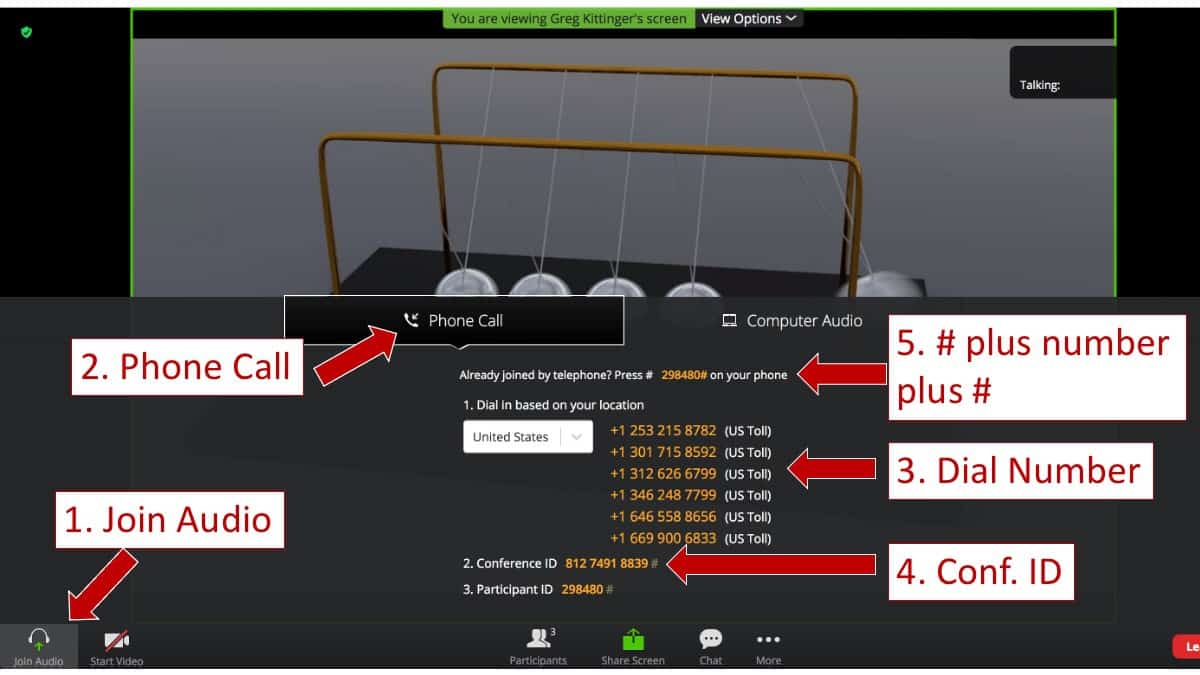
Most of the information on this tech slide below only applies to those who DO NOT have computer audio. If you will be connecting to computer audio, ignore this slide.
If you are using a computer that does NOT have a microphone and speakers, you will need to call in with your phone to connect your audio to the session. This image shows how to find the phone numbers to call, and how to properly connect your phone call to your computer login.
The Hosts will also help guide you through the process.
Positive Associate Relations Training
Phone Dial-in info. Only use if you do NOT have computer audio.
Meeting ID: 821 5387 3458
One tap mobile
+12532158782,,82153873458# US (Tacoma)
+13462487799,,82153873458# US (Houston)
Dial by your location
+1 253 215 8782 US (Tacoma)
+1 346 248 7799 US (Houston)
+1 669 900 6833 US (San Jose)
+1 301 715 8592 US (Washington DC)
+1 312 626 6799 US (Chicago)
+1 646 558 8656 US (New York)
Meeting ID: 821 5387 3458
Find your local number: https://us02web.zoom.us/u/kcqpBDCOQQ
Click the button below to join the meeting. If you DO NOT have computer audio, use the information to the left to connect to audio with your phone after you have joined the Zoom meeting using the button below.
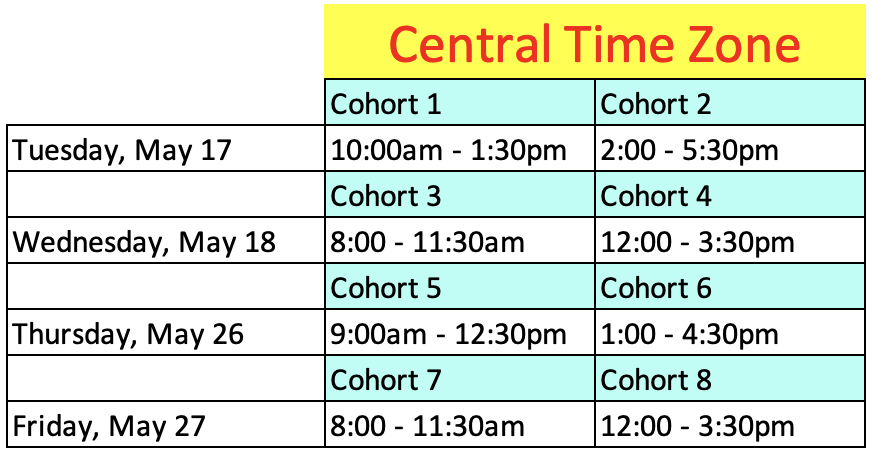
The calendar below let’s you know when to log in for your session.
Please join 5-10 minutes early for your session!
Just find the appropriate day and mark your calendar accordingly, then use either the session link (which you can copy/paste into your calendar meeting) or the Join Button above.